![Logo Arenametrix détouré blanc HD.png]](https://guide.arenametrix.com/hs-fs/hubfs/Logo%20Arenametrix%20d%C3%A9tour%C3%A9%20blanc%20HD.png?height=44&name=Logo%20Arenametrix%20d%C3%A9tour%C3%A9%20blanc%20HD.png)
1. Create and manage tags
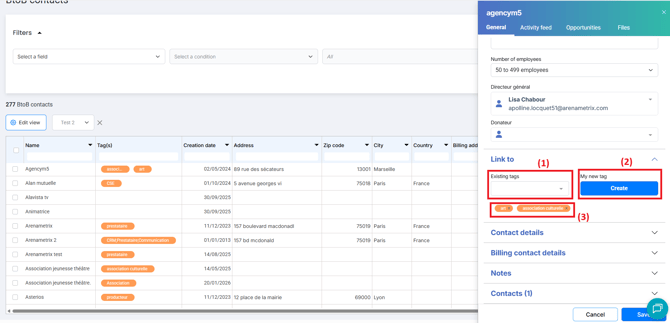
To create a tag, go to the structure record in the Associated with section, then click on Edit. You can either add an existing tag using the dropdown menu (1) or create a new tag (2) and add it (it will then be saved among the existing tags).
Tags associated with a structure appear in the orange boxes (3). To remove a tag, click the cross in the orange box.
Then click Save.
2. Add tags in bulk
You can also add tags in bulk to multiple structures at the same time. To do this, select the desired structures by checking the box to the left of the name (1), then click the More options button (2) and select Add tags (3) from the dropdown menu.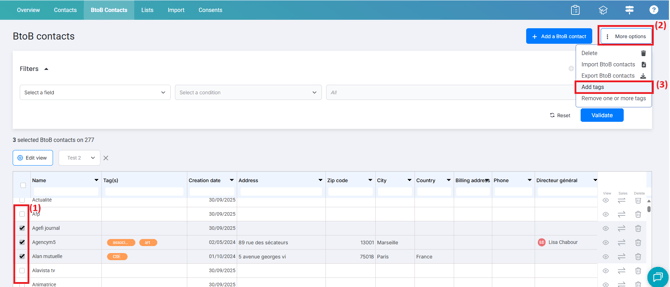
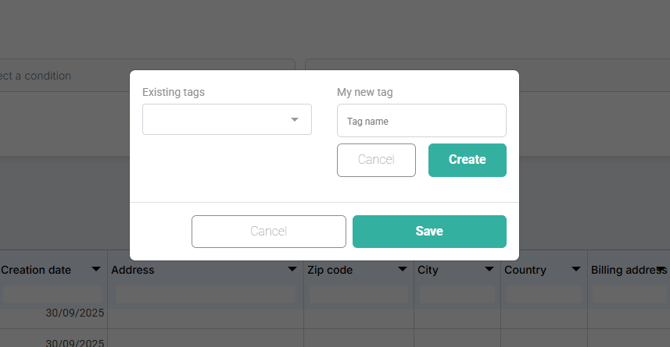
You can then select existing tags from the dropdown menu or create new ones by entering the tag name in the Tag name field and clicking Create. Once the tags are selected, click Save.