![Logo Arenametrix détouré blanc HD.png]](https://guide.arenametrix.com/hs-fs/hubfs/Logo%20Arenametrix%20d%C3%A9tour%C3%A9%20blanc%20HD.png?height=44&name=Logo%20Arenametrix%20d%C3%A9tour%C3%A9%20blanc%20HD.png)
- Contacts
- Organizations
- Global consumption
- Detailed consumption
- Tickets
- Email campaigns
- Contributions
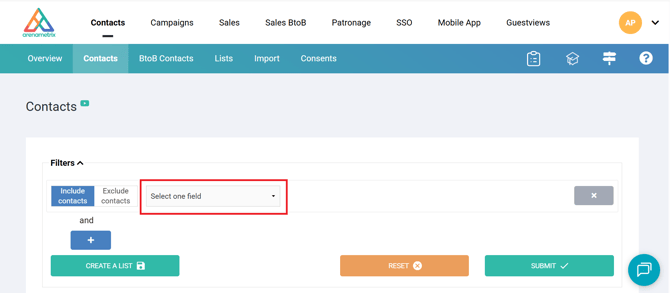
You will find all these criteria by clicking on the Select one field dropdown menu.
1. Contacts
|
Name |
Search for a contact by name. |
| First name | Search for a contact by first name. |
|
Email adress |
Search for a contact by his email but also search for all contacts who have or do not have an email. |
|
Gender |
Segment contacts based on their gender, if this information is available. |
|
Age |
Segment by the age of your contacts if the date of birth is entered. |
|
Date of birth |
Search for contacts based on their date of birth, if this information is available. |
|
Position |
This represents the function of the contacts, if filled in. |
|
Phone |
Search by phone number, or search for all contacts who have a phone number to send them an SMS. |
|
Distance |
This is the distance between the location of your nearest activity and the address of the contact. It is calculated in kilometers. |
|
Zip code |
Search for contacts using their postal code. This allows you to create groups of contacts by geographical area. |
|
Department |
Search for contacts through their department. |
|
Country |
Search for contacts through their country. |
|
Language |
Search for contacts based on the language specified in their contact record. |
|
Lists |
Search for contacts belonging to one or more lists. |
|
Consents |
Search for Opt-in or Opt-out contacts. |
|
Types of import |
Search for contacts based on their origin: Static target, Dynamic target or Manual import. |
|
Notes |
Notes are free-text fields available in contact records. You can search for all contacts sharing a common element within the notes. |
2. Organizations
| Organization | Allows you to search for contacts linked to one or more selected organizations. |
| Organization - advanced search | Search for contacts linked to an organization using text-based search criteria. |
| Tag | Search for contacts belonging to an organization that has a specific tag. |
3. Global consumption
| Recency | Look for people who have not purchased for a while. Calculated in days. |
| Loyalty | Search for contacts who came a number of times over the last three years. The loyalty is the number of purchases containing at least one performance that took place either in the last 36 months or in the future. |
| Purchase lead time | Find contacts who buy on average a certain number of days before the event. Calculated in days. |
| Average basket value | Create a group of people who have an average basket of more or less a certain amount. Calculated in euros. |
| Average basket volume | Create a group of people who have an average basket of plus or minus a certain number of tickets. Calculated in number of tickets. |
| Total purchases value | Search for contacts who have spent more or less a certain amount of money. Calculated in euros. |
| Number of tickets purchased | Find the people who have purchased more or less a certain number of tickets. Calculated in number of tickets. |
| Average price | Group a population in relation to the average price they usually spend for your services. |
| Maximum price | Group a population with respect to the maximum price they spent on a single order. |
4. Detailed consumption
| Number of tickets | Search for contacts based on the total number of tickets obtained. |
| Number of purchases | Search for contacts by the number of unique orders criterion. |
| Total purchases value | Find contacts based on the total amount spent on all orders. |
| Number of performances | Create population groups based on the number of performances they have attended. |
| Number of events | Create population groups based on the number of events they have attended. |
5. Tickets
| Ticket status | Search for contacts who have purchased and/or reserved and/or cancelled their order. |
| Venue | People who have participated in an event in a particular location. |
| Season | People who have obtained a ticket for a particular season. |
| Types of events | Retrieve contacts who have participated in several events that belong to an event type. |
| Event | Find contacts who have participated in one or more events. |
| Performance | Find the contacts who participated in one or more performances. |
| Sales channel | Search for contacts based on their buying channel. For example, all people who bought online. |
| Type of categories | Retrieve contacts who have obtained a ticket from a category type. |
| Category | The result is different depending on your ticketing software. This represents people who have purchased a particular category or fare. |
| Type of pricing formulas | Retrieve contacts who have obtained a ticket belonging to a type of price formula. |
| Pricing formula | Allows you to find contacts who have obtained a ticket for a particular price formula (fare). |
| Type of ticket | Search for contacts based on the type of ticket purchased. |
| Subscription/pack name | Search for contacts who have purchased a specific subscription or pack. |
| Sales period | Group contacts according to a purchase period. Either between two dates. |
| Performances period | Group the contacts who participated in a performance during a given period. Either between two dates. |
| Ticket amount | Search for contacts based on the ticket price purchased. |
6. Email campaign
| Campaigns | Find the contacts who received a particular campaign. |
| Sent emails | Retrieve contacts who have received one of your emails over a period of time, between two dates. |
| Delivered emails | Find the contacts for whom one of your emails was delivered over a period of time, between two dates. |
| Opened emails | Find the contacts who opened one of your emails over a period of time, between two dates |
| Clicked emails | Find the contacts who clicked on one of your emails over a period of time, between two dates. |
| Date of click | Find contacts based on the date when a link was clicked in an email. |
| Clicked links | Find the contacts who clicked on a particular link in one of your emails |
7. Contributions
| Satisfaction | Retrieve respondents based on the satisfaction rating they gave |
| Facility | Find respondents according to the location where they completed the questionnaire. |
| Date of publication | Find respondents according to the date on which they completed the questionnaire. |