![Logo Arenametrix détouré blanc HD.png]](https://guide.arenametrix.com/hs-fs/hubfs/Logo%20Arenametrix%20d%C3%A9tour%C3%A9%20blanc%20HD.png?height=44&name=Logo%20Arenametrix%20d%C3%A9tour%C3%A9%20blanc%20HD.png)
WhatsApp is today the most widely used communication channel in the world, with over 2 billion users. Adding it to your marketing strategy lets you reach your contacts where they are already active, deliver individual and personalised communications, and benefit from better engagement rates than email or SMS. It is a particularly well-suited channel for confirmations, event reminders, or targeted offers. Brevo allows you to create and send WhatsApp campaigns directly from your account, just like your email campaigns.
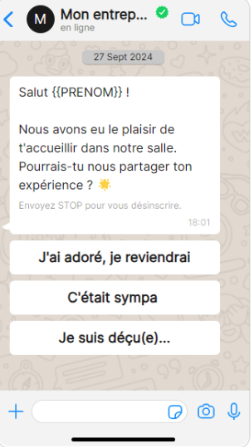
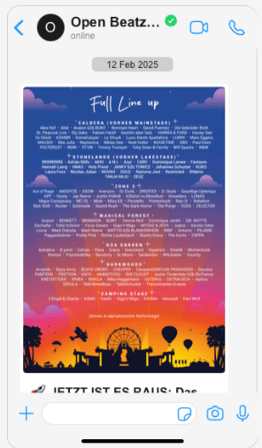
Examples of WhatsApp campaigns sent by our clients
Before sending any message, a setup step is required: connecting your WhatsApp Business account to Brevo. It is important to anticipate this configuration time, which can take several days depending on the checks required by Meta.
1. Connecting your WhatsApp Business account to Brevo
To send WhatsApp campaigns, you must first link a WhatsApp Business account to Brevo. This is not the personal WhatsApp account you use daily, but a dedicated business account, associated with its own phone number. This number must not already be in use on a standard WhatsApp account.
To start the connection, go to the Campaigns tab (1), then select WhatsApp (2) from the menu, and finally click Create campaign (3).
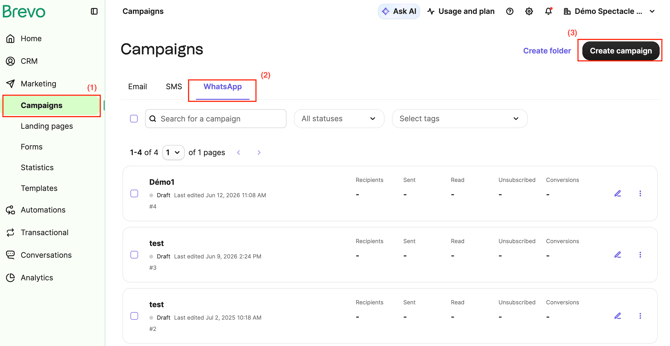
The connection is then made via Facebook: you need a professional Facebook account, or you can create one directly from Brevo. Once the connection is initiated, your phone number will need to be verified by SMS or call.
Allow several days to complete this step, particularly if you need to create a Facebook account (an approximately one-hour wait is required before continuing) or if Meta carries out a manual review of your Business account, which can take up to an additional 24 hours.
For the detailed step-by-step connection process, see this Brevo article.
2. Creating your WhatsApp messages
Unlike an email, a marketing WhatsApp message must go through a pre-approved template validated by Meta before it can be sent. This is a requirement imposed by WhatsApp to limit abuse and spam on the platform.
In practice, this means you need to anticipate creating your templates ahead of your campaigns: once submitted, their validation by Meta can take several hours. An unapproved template cannot be used or scheduled.
To learn how to create and get your WhatsApp templates approved, see this Brevo article.
3. Sending your campaign
Once your account is connected and your templates approved, you're ready to launch your WhatsApp campaigns from Brevo. For the detail of this step, see this Brevo article.